


Date
October 2024 - January 2025
Project Type
UX Design
Location
Online
Challenge
Users require access to a camping supply store across all platforms, as they may need it while on the move, such as during their holidays, and might not have a computer readily available.
Goal
To give people a simple, customised, and intuitive way to buy and rent camping supplies.
My role
This is an individual project that allowed me to plan and direct each step of the design thinking process as a UX design student with mobile and responsible web UI design experience.
Responsibilities
-
Conduct user research
-
Define the problem and provided insights to inform the ideation phase
-
Define personas, user journeys, empathy maps and user flows
-
Visual design of low-fi and high-fi wireframes, prototypes, and user testing
Research
Key challenges & constraints
My main challenge was the fact that it is a mock-up, and I had to find content. I used AI to help me find the basics of the app.
Competition
My research involved looking into existing apps and websites. I discovered that my key competitors are mostly national companies that sell to adults and families. They have a varied range of products, from hiking equipment to camping gear to ski and swimming outfits, like Decathlon Canada or Canadian Tire. Decathlon is renowned for its good price/value ratio with its quality own-brand products. Canadian Tire, though mostly famous for its automotive parts, also has outdoor and sporting equipment. All of the apps and websites are responsive on desktop and mobile, and they all have a comprehensive and easy-to-use menu. They also have dedicated apps. Canadian Tire is national, but Decathlon is international and has a bilingual website (French, English).
Hi, I'm Jane!
I've always loved to travel and hike with my family. After a hiking trip in South America with my friends, I decided I wanted to continue hiking and started posting blogs and posts on social media. My community has grown from there! I've traveled all over the world and camped in a lot of different places to gain experience, but now I want to tackle another challenge: hike and camp for a few months across Canada. I also want to educate my community about environmental issues, and finding responsible shops and companies is really important to me.
And I'm Marco!
As a kid, I loved the weekend camping trips I took with my family. Now that my daughters are older, I would love to go camping with them and my wife and discover the region. But now that I'm an adult, I realize I'm not sure where to start and need some guidance to find the right products. Renting gear also seems interesting to me, as I don't want to leave for a long period of time—at least for now!


User personas
My research led me to create two personas that embody the potential users of Trailtales.
Based on those two personas, my target audience is any adult that wants to buy camping supplies. They can use phones, tablets, or computers, as users might want to buy products sitting on their couch with their laptop, or during their holidays on their phones.
Pain points
Buying camping equipment can be expensive. Buying or renting them for a short period of time could help users.
1
Having high quality pictures and reviews is important for the customers to find the right products.
2
Being able to read guides is important for customers to find the right product.
3

Sitemap
Design
My research led me to create two personas that embody the potential users of Trailtales.
First drawings
I started my design process by focusing on creating low-fidelity prototypes that showed the main pages of the app, like the homepage, the search page and the product description page. I also started with the app version as it is smallest size and the course followed the progressive enhancement method.


Main pages & Elements
- Hero banner
- Recommendations
- Banners to showcase the app values (eco page, etc.)
Homepage
- High-quality photos
- Reviews
- Description
- Advices
Product
- High quality photos
- Blog text
- List of blogs
Guides
After drawing my wireframes, I used Figma to create digital low-fidelity wireframes of all pages.


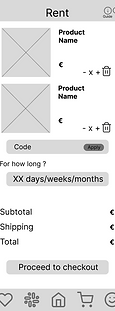


The above wireframes show the basic user flow of the app, going from the homepage, the choice of a product to the checkout process and a simple account view. While the participants of my user study liked the app and found it clear to use overall, some icons were not clear and some necessary information was missing.

Most users seemed confused by the lack of renting options.
The icons chosen were not understood by some users.
Layout of the homepage

Improve the calendar and add more options and information.
1
Update and consider adding the name of the icon for clarity and accessibility. I also need to adjust the size of some of the icons as they were too small and unclickable.
2
Improve the layout of the homepage as most users were confused by the order of the sections. For example, the best sellers should be part of the first things the customer sees.
3
Switching to high-fidelity prototypes
After concluding my first user study and noting down the areas of improvements, I started desiging my hi-fi mockups and creating the final prototype.
As it is mock project, I had to chose my own colours and chose to go for shades of green and reds. I had chosen first a deep green (#093824) but ended up choosing a lighter green shade (#ECEEE5) for the bottom and top bars for a calmer color harmony. The buttons pressed down are red (#BF4E30) to show their importance. The image below shows the full range of the colour palette.

Typography
After deciding on a colour scheme, I started working on the type fonts and type faces. For titles I chose the font "Bangers" while for the main text I went for the "Ubuntu Sans" font. The icons name also have their distinct font "Bebas Neue"

Iconography
I also spent time choosing icons for the menu bars or icons used as symbols.

The wish list and cart icons also have variants with the number of articles in the basket or saved list so that users can easily know if they already have something in these spaces.
Trailtales also uses other icons that are used for example on the Sustainability page or the About page. A lot of the icons are also used on the product page to easily show the product advantages.

First high-fidelity wireframes
Here is the main user flow.


The hi-fi wireframes show pictures of the products as well as marketing banners. The hero banner and the best sellers are interactive to show more products or deals.
.png)
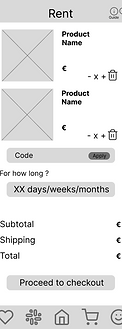
After results of my user study, I clarified the cart page to differentiate between the product bought and rented. Customers also the option to apply a promo code if they have.


Some participants of my user study were confused by the end of the checkout process so I have split it into two, one for the address and one for the payment details.

.png)
This is the main product page. It shows high-quality pictures of the product and clickable buttons for the reviews, detailed description and advices related to the tent. Users are also able to share or like the item.


The calendar page has also been improved following my participants feedback, such as adding an unavailable range, and adding info for the start date and time of the rental, as well as the daily rate and number of days.


The confirmation page has been slightly simplified as well.
Emma
Emma is my mock user I created for this project as I also created the sign-up and account pages.

Hi!!
I'm Emma MacCleane, I was born in Victoria, on the Vancouver island and my parents have taken me all over the island as a kid to discover the beautiful beaches and nature there. My parents took me and my sister in their van, but as I grew up, I grew to love hiking and backpacking more, so now I combine both! I also love trail running and travelling. My main goal for the new year is to take a couple of weeks off in April to discover the island again, but on my own this time, which is something I've never done before!


.png)
.png)


The account pages will automatically fill in with the info provided by the user during their registration. I also created all banners.
Improvements to be made before the final product
I performed a second moderated and unmoderated study to gain feedback for potential users, who are the same pool of participants as the first time, adults above the age of 18, some are tech-savy and some with little experience with e-commerce apps.
The dropdown menus were not responsive and all users were not able to select all times and cities.
1
Some of the buttons were located too low and some users were confused as they couldn’t see the option to continue right ahead.
2
Some users were confused by the calendar, especially the unavailability design choice.
3
Final app prototype
Here is the final mobile app prototype
First drawings to hi-fi prototypes
From mobile to desktop and tablets
After finalising the mobile app, I started desiging and drawing for the desktop and tablet version of Trailtales.
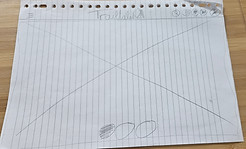
I started by drawing the homepage used on the desktop versions.
_edited.jpg)
The desktop version of the homepage still contains the hamburger menu but the logo and icons locations have changed. The paper wireframe only shows what users will see above the breakpoint, which is a large hero banner showcasing the deals and new products.
Surprisingly, the biggest challenge for the desktop version was the top and bottom bars.
To follow most of the competition, I chose to add the searchc bar, all categories and the the important pages like the FAQ and guides so that users can easily access them. The bottom bar also contains important pages like the general conditions.


One of the other biggest changes going from mobile to desktop was the categories pages. Thanks the added space I was able to add the filters next to the product cards.
The account design also changed thanks to the added space.

Tablets
_edited.jpg)
Portrait

Landscape - with fly out menu
Dark mode & accessibility
I also created a dark version for people who prefer to use the dark mode or for people who prefer this contrast.
Create Your First Project
Start adding your projects to your portfolio. Click on "Manage Projects" to get started
